Table of contents
Mobile commerce hit $2.07 trillion in 2024, growing 21% year-over-year. And 57% of those sales happened on mobile devices – not desktop, not mobile browsers, but dedicated apps.
If you’re building an eCommerce app in 2026, mobile isn’t a nice-to-have. It’s the product.
This guide is based on building a production Flutter eCommerce app at Droids On Roids. It covers the decisions we made, the architecture we chose, and – importantly – what I’d do differently if we started today. There’s real code throughout, real tradeoffs, and a few things I wish someone had told us earlier.
What you’ll learn:
- When Flutter is the right choice for eCommerce – and when it isn’t
- How to structure a modular Flutter app, and why starting simpler usually works better
- How to solve cross-module navigation without callback hell
- What the full development lifecycle looks like, from Discovery through post-launch monitoring

Is Flutter the right choice for eCommerce?
Before writing a single line of Dart, the right question isn’t “how do we build this in Flutter?” It’s “should we build this in Flutter at all?”
Technology is a means to an end, not an end in itself. Flutter, like any framework, has specific strengths – and specific cases where another tool serves you better.
Here’s how I think about the decision:
React Native: when your team already lives in JavaScript
If you run a web ecosystem built on React, React Native is the clear winner. Your web developers can transition to mobile with minimal friction. Code logic – and sometimes components – can be shared across browser and app. Flutter would require your team to learn Dart and an entirely separate ecosystem, effectively doubling your hiring or training needs.
Kotlin Multiplatform: when you need native at the system level
For projects requiring deep integration with system-level features – custom audio engines, complex background sensor processing, hardware-specific APIs – KMP gives you direct, first-class access to native APIs without a translation layer. Flutter and React Native both work as an abstraction; whenever you need something they don’t cover natively, you write “glue code” (Platform Channels or JSI). KMP skips that overhead entirely.
Flutter: when UI consistency and brand identity are the product
For eCommerce, this is usually the case. Unlike React Native – which maps to platform-native components and can introduce subtle visual discrepancies between iOS and Android – Flutter renders everything through its own engine. Your design is identical on every device.
KMP would require maintaining two separate UI layers (SwiftUI and Jetpack Compose). Flutter gives you one, with a polished, custom-branded result on both platforms simultaneously.
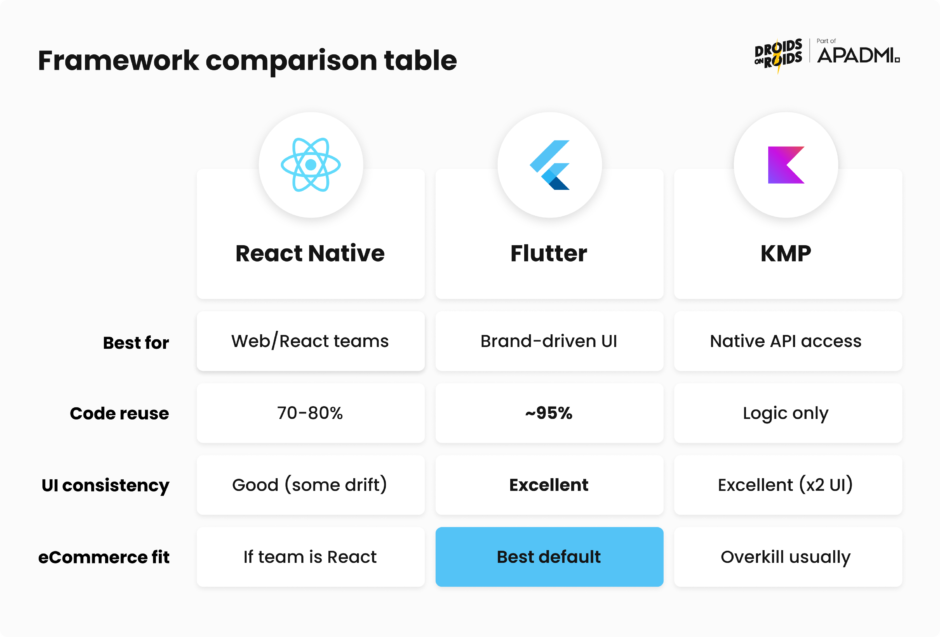
| Criterion | React Native | Flutter | KMP |
|---|---|---|---|
| Best for | Web-first teams with React experience | UI-intensive, brand-driven products | System-level, performance-critical apps |
| Code reuse | 70–80% (especially with React web) | ~95% across iOS/Android | Logic & data layer only (separate UI per platform) |
| UI consistency | Good (native components, some drift) | Excellent (own renderer) | Excellent (but built twice) |
| Learning curve | Low (JS/TS ecosystem) | Medium (Dart) | High (Kotlin + 2 UI frameworks) |
| eCommerce fit | If team is React-native | Best default choice | Overkill unless native APIs required |
For our project – an eCommerce app where brand identity and seamless UX were central requirements – Flutter was the right call.
Before you write code: Discovery and definition
Every Flutter tutorial starts at the same place: open Android Studio, create a new project, start building. I get it – you want to write code.
But the architectural mistakes I’ve seen – including ones we made ourselves – almost never come from choosing the wrong state management library or the wrong navigation package. They come from building the wrong thing, or building the right thing for the wrong user, or starting with a module structure that made sense for a product that turned out to be completely different six weeks in.
At Droids On Roids, we run a Discovery phase before any code is written. It’s a structured set of workshops with the client – product strategists, UX researchers, designers, and developers in the same room – working through the fundamental questions: what problem are we actually solving, who has this problem, and what would “solved” look like.
The output isn’t a document. It’s alignment. The whole team starts from the same understanding of what success means and where the biggest risks are.
Discovery feeds directly into the Definition phase: translating that strategy into user flows, wireframes, and Proofs of Concept for anything technically uncertain. This is also when the tech stack gets decided – not based on what’s trendy, but on what fits the team’s constraints and the product’s actual requirements.
Skipping this feels fast. It usually isn’t. The projects where architecture fell apart mid-development were almost always ones where requirements kept changing – because nobody had nailed down what the product was supposed to do before the first sprint started.
Our tech stack for a production eCommerce app
With strategy and scope defined, here’s the stack we chose and why we chose it:
| Category | Tools/Libraries | Why |
|---|---|---|
| Framework & Language | Flutter + Dart | Rendering engine advantage for brand-driven UI |
| State Management | BLoC + flutter_hooks | BLoC for complex business logic; hooks for UI lifecycle management without StatefulWidget boilerplate |
| Architecture & DI | Melos (monorepo) + get_it + injectable | Compile-time dependency injection; melos for managing modular packages |
| Networking & Data | dio + retrofit + json_serializable | Type-safe HTTP clients with code generation |
| Navigation | go_router | Declarative, URL-based routing with deep linking support; officially recommended by the Flutter team |
| Backend & Analytics | Firebase suite (auth, firestore, analytics, crashlytics) + Exponea | Real-time data + advanced marketing automation |
| Observability | talker + fimber | Structured logging across BLoC events, network requests, and UI layer |
| Utilities | intl | Multi-currency and multi-language support |
A few notes on the less obvious choices:
BLoC over Riverpod or Provider: For eCommerce, state is genuinely complex – cart state, auth state, order history, checkout flows. BLoC’s explicit event/state model makes that complexity manageable and testable. Riverpod is excellent for simpler apps; BLoC shines when your state machine has many transitions.
flutter_hooks alongside BLoC: Hooks handle the UI lifecycle (initialization, disposal) cleanly without converting everything to StatefulWidget. The combination reduces boilerplate while keeping logic in the right layer.
Melos for the monorepo: We manage multiple packages – core, design system, data modules, feature modules – in one repository. Melos automates dependency linking, running scripts across packages, and versioning. Without it, a modular Flutter project becomes unwieldy fast.
Modular architecture: what we built and what we’d change
This is the section I’d want to read before starting. Architecture decisions made in week one don’t feel consequential at the time. They become consequential around week eight, when you’re trying to add a feature that cuts across three modules and nothing fits together the way you thought it would.
The module structure we used
We organized the app into five layers of modules:
App module
The entry point and orchestrator. Its only job is to wire everything else together – it defines the navigation structure and composes routes from all functional modules into one configuration.
@Singleton(as: ModulesConfig)
class AppModulesConfig extends ModulesConfig {
  AppModulesConfig()
      : super(<ModuleManifest>[
          // Foundation layer
          const CoreModule(),
          const DesignSystemModule(),

          // Data modules (d_*)
          const DAuthenticationModule(),
          const DOrdersModule(),
          const DUserModule(),

          // Functional modules (f_*)
          const FAuthenticationModule(),
          const FOrdersModule(),
          const FProfileModule(),
          const FHomeModule(),
        ]);
The initialization loop registers dependencies in order, collects interceptors from each module, and assembles routes:
  Future<void> initModules() async {
    final GetItHelper getItHelper = GetItHelper(getIt, Environment.prod);
    final List<Interceptor> interceptors = <Interceptor>[];

    for (final ModuleManifest manifest in modules) {
      await manifest.dependencyInjectionModule.init(getItHelper);
      interceptors.addAll(manifest.interceptors);
    }

    registerInterceptors(getIt: getIt, interceptors: interceptors);
  }
Core module
The architectural foundation. It defines the ModuleManifest contract that every module must implement, provides shared infrastructure (networking, error handling, feature flags), and exports key patterns – including the Either type for error handling without exceptions.
abstract class ModuleManifest {
  const ModuleManifest();

  MicroPackageModule get dependencyInjectionModule;

  List<RouteGuard> get routeGuards => <RouteGuard>[];

  List<NavigatorObserver> get routeObservers => <NavigatorObserver>[];

  LocalizationsDelegate<dynamic>? get localizationsDelegate => null;

  List<Interceptor> get interceptors => <Interceptor>[];
}
The Either type is worth explaining. Instead of throwing exceptions, every service returns Either<Error, Success>. The UI handles both cases explicitly through fold():
abstract class Either<L, R> {
  const Either();

  T fold<T>(T Function(L) ifFailure, T Function(R) ifSuccess);

  Either<L, T> map<T>(T Function(R) f);

  Either<L, T> flatMap<T>(Either<L, T> Function(R) f);

  R getOrElse(R defaultValue);
}
This pattern makes error handling impossible to ignore – the compiler enforces it.
Design system module
UI tokens (colors, typography, spacing) and shared widgets. All functional modules depend on this; none duplicate it. Tokens are accessible through BuildContext extensions:
extension BuildContextUtils on BuildContext {
  Spacing get spacing => Theme.of(this).extension<Spacing>()!;
  AppColors get colors => Theme.of(this).extension<AppColors>()!;
  AppTypography get typography => Theme.of(this).extension<AppTypography>()!;
}
Data modules (d_*)
These handle all data access: API clients, Firestore, local storage, DTOs, and domain mappers. No UI. They’re shareable – d_user is used by both f_profile and f_authentication. Services always return Either:
@LazySingleton(as: OrdersService)
class OrdersServiceImpl implements OrdersService {
  final OrdersDataSource _dataSource;
  final GenericErrorHandler _errorHandler;

  @override
  Future<Either<GenericError, List<OrderItem>>> getOrders({
    required int page,
  }) async {
    try {
      final OrderHistoryDto dto = await _dataSource.getOrders(page: page);
      return Success(dto.items.map((item) => item.toDomain()).toList());
    } on DioException catch (e) {
      _errorHandler.silentlyReportError(e, e.stackTrace);
      return Failure(e.handleException);
    }
  }
}
Functional modules (f_*)
Screens, widgets, BLoC/Cubits, routing. The critical constraint: no f_ module depends on another f_ module**. Cross-module communication goes through callbacks in the app layer. This is the rule that caused us the most pain – and for good reason.
Here’s what a Cubit looks like consuming a service and emitting typed states:
@injectable
class OrderHistoryCubit extends DorCubit<OrderHistoryState> {
  final OrdersService _ordersService;
  OrderHistoryCubit(this._ordersService)
      : super(const OrderHistoryLoading());

  Future<void> loadOrders() async {
    emit(const OrderHistoryLoading());
    final result = await _ordersService.getOrders(page: 1);

    result.fold(
      (_) => emit(const OrderHistoryError()),
      (orders) => emit(OrderHistoryLoaded(orders: orders)),
    );
  }
}
And the page consuming that state with Dart’s sealed classes and switch expressions:
class OrderHistoryPage extends HookWidget {
  @override
  Widget build(BuildContext context) {
    final cubit = useBloc<OrderHistoryCubit>();
    final state = useBlocBuilder(cubit);
    useOnce(cubit.loadOrders);

    return DorScaffold(
      body: switch (state) {
        OrderHistoryLoading() => const DorLoadingBox(),
        OrderHistoryLoaded(:final orders) => ListView.separated(
            itemCount: orders.length,
            separatorBuilder: (_, __) => const DorDivider(),
            itemBuilder: (_, index) => _OrderTile(order: orders[index]),
          ),
        OrderHistoryError() => GenericErrorBody(onRetry: cubit.loadOrders),
      },
    );
  }
}
The switch expression on sealed states is one of Dart 3’s best additions – exhaustive pattern matching makes it impossible to forget a state.

What went wrong – and what we’d do differently
The architecture was technically correct. That’s the frustrating part – it wasn’t wrong, it was just premature.
The Discovery phase gave us confidence that we understood the product well enough to design a stable structure upfront. And we did understand it – until requirements kept evolving during refinements, as they always do in practice. The consequences were real:
- Debugging became harder. Tracing a data flow through multiple independent packages takes longer than tracing it through a single codebase.
- Boilerplate multiplied. Even trivial features required creating module manifests, setting up DI registrations, and threading routes through multiple layers.
- Routing became brittle. When business logic changed – and several screens that were theoretically unrelated suddenly needed to link to each other – the inter-module routing structure didn’t accommodate it gracefully.
- UI sharing created unexpected coupling. We built a store selector component, used it on many screens, and had to make it a f_* module. Half the other functional modules ended up depending on it, which violated the original isolation principle.
The approach I’d take today:
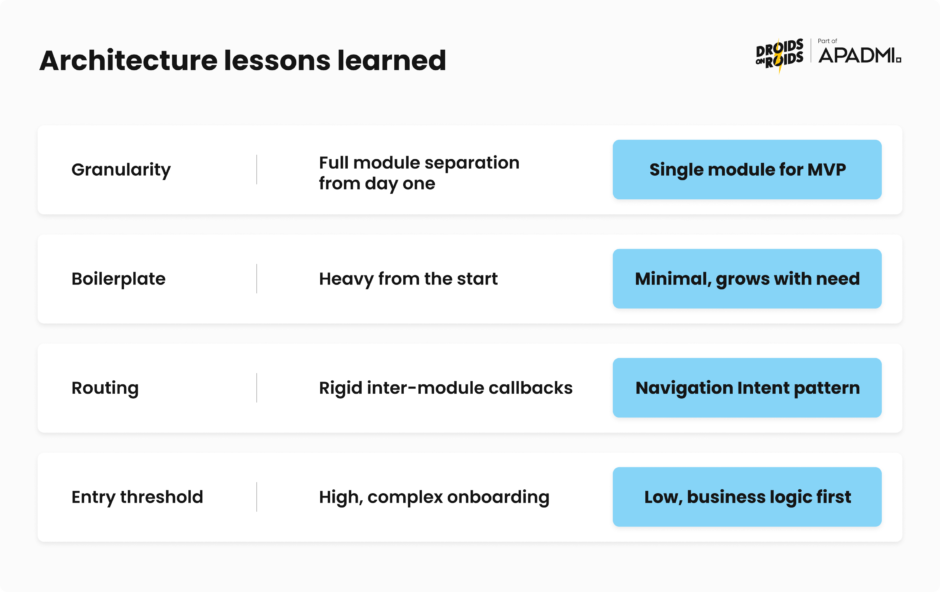
| Aspect | What we did | What I’d do now |
|---|---|---|
| Granularity | Full module separation from day one | Single logical module for MVP, extract when stable |
| Boilerplate | Heavy from the start | Minimal, growing with actual need |
| Routing | Rigid, inter-module callbacks | Flexible, centralized in app module |
| Entry threshold | High (complex structure to onboard) | Low (focus on business logic first) |
Monolith-first for MVP/MLP. Keep the modular skeleton so the team learns the target structure – but put most business logic in a single main module (e.g., app). Prioritize High Cohesion and Low Coupling within one unit over physical package boundaries.
Evolutionary extraction after stabilization. Only begin extracting f_* & d_* modules after the product has stabilized post-MVP – when new requirements become less frequent and more predictable. The boundaries between domains reveal themselves during development; they’re hard to predict upfront.
Navigation that scales: From callback hell to NavigationIntent
As the project evolved, navigation became our biggest maintenance problem. What started as a reasonable approach turned into a system that was increasingly difficult to change.
The original approach: Callbacks all the way down
The initial design was architecturally correct: functional modules don’t know about each other, so any cross-module navigation was expressed as callbacks, passed inward from the app layer.
In theory, clean. In practice:
// app/routing/routes.dart
class AppRoutes {
  static List<GoRoute> getRoutes() {
    return [
      GoRoute(
        path: '/',
        builder: (context, state) => LandingPage(
          onGoToTermsAndConditions: (context) =>
              context.goNamed(FLegalRoutes.termsAndConditions.name),
          onLoginSuccess: (context) =>
              context.goNamed(FContentRoutes.appContent.name),
        ),
      ),
      ...FContentRoutes.getSubtree(
        termsAndConditionsRouteBuilder: (routeDef) =>
            FLegalRoutes.getTermsAndConditionsRoute(routeDef),
        onLogout: (context) => context.goNamed('/'),
      ),
    ];
  }
}
Each module needed a long list of callback parameters in its getSubtree() method. Adding one new transition between screens meant touching the widget, the module routing definition, and the app layer. Every new business requirement compounded the complexity.
The solution: NavigationIntent pattern
We decoupled navigation into two categories: intra-module and cross-module.
Intra-module navigation (e.g., product list → product detail within the same domain) happens directly through context.goNamed(). No intermediary needed.
Cross-module navigation (e.g., successful login → home screen) goes through an Intent – a simple object representing a business event, not a URL.
Define intents for a module:
// f_authentication/lib/routing/navigation_intents.dart

sealed class FAuthenticationNavigationIntent extends NavigationIntent {}

class LoginSuccessNavigationIntent extends FAuthenticationNavigationIntent {}

class RegisterSuccessNavigationIntent extends FAuthenticationNavigationIntent {}

Emit an intent in the widget - no knowledge of what happens next:
void _onLoginEvent(LoginState state, BuildContext context) {
  if (state is LoginSuccess) {
    // We don't care where the user goes - we just announce what happened
    context.emitNavigationIntent(LoginSuccessNavigationIntent());
  }
}

// Intra-module navigation stays direct
DorButton.filled(
  onPressed: () => context.goNamed(FAuthenticationRoutes.login.name),
  text: 'Sign in',
);

Map intents to routes centrally in the app module:
// app/lib/routing/navigation_intent_mapper.dart
NavigationCallback mapNavigationIntentToCallback(NavigationIntent intent) {
  return switch (intent) {
    FAuthenticationNavigationIntent() => switch (intent) {
      LoginSuccessNavigationIntent() ||
      RegisterSuccessNavigationIntent() =>
          (GoRouter router) => router.goNamed(AppRoutes.home.name),
      _ => (router) => doNothing(),
    },
    FProfileNavigationIntent() => switch (intent) {
      UserLoggedOutNavigationIntent() =>
          (router) => router.goNamed(AppRoutes.landing.name),
    },
    _ => (router) => doNothing(),
  };
}
The result: modules announce what happened, the app layer decides where to go. No more callback chains threading through constructors.
| Aspect | Callbacks | NavigationIntent |
|---|---|---|
| Module knowledge | Must know what actions are available outside | Communicates only the business event |
| Boilerplate | High – parameters through multiple constructors | Minimal – one simple Intent class |
| Readability | Navigation logic mixed into view code | Clean “emit and forget” |
| Scalability | Each new cross-module route complicates AppRoutes | Add intent, map centrally – done |
Development, UATs, and launch
With architecture in place, the project moves into sprints. For eCommerce specifically, a few things come up repeatedly that are worth flagging.
Development phase
eCommerce apps have a deceptive quality: the core flows look simple on a whiteboard. Product list, product detail, cart, checkout, confirmation. But each of those screens has edge cases that don’t show up until you’re deep in implementation – out-of-stock states mid-checkout, payment failures that need graceful recovery, cart sync when a session expires mid-browse.
Budget more time for the checkout flow than it looks like it needs. It’s always the most complex part of the app.
Backend integrations are the other common source of delays. Payment gateways, logistics APIs, and inventory systems rarely behave exactly as their documentation suggests. Sandbox environments have subtle differences from production. Plan for this explicitly rather than treating integration testing as a formality at the end.
One thing we do from day one: wire up Firebase Crashlytics and structured logging before any user-facing feature is complete. Debugging a production crash without logs is painful. Debugging it with full BLoC event traces and network request history takes minutes.
User acceptance testing
UATs for eCommerce have to be end-to-end – real payment sandbox credentials, real inventory data, real devices across a spread of iOS and Android versions. The checkout flow in particular behaves differently across platforms in subtle ways: keyboard behavior, payment sheet presentation, biometric authentication prompts.
The stage that teams most often skip – and that consistently catches real problems – is family and friends testing. Handing the app to people who aren’t developers, who don’t know what you were trying to build, reveals friction that structured test cases miss. Checkout flows with too many steps. Images that look fine on a Pixel 8 and broken on an older Samsung. Confusing empty states when a product goes out of stock.
It feels informal. It isn’t. Ship with this feedback incorporated and you’ll have fewer one-star reviews in the first week.
App Store Optimization (ASO)
Before launch, the app listing deserves the same attention as the app itself. The three areas that move the needle most:
- Screenshots and preview video – the most influential conversion factor; show the actual purchase flow, not just marketing imagery
- Title, subtitle, and keywords – determines how you appear in search; front-load the primary keyword before the fold
- Ratings strategy – prompt satisfied users at the right moment (post-purchase, after a successful delivery), not with a generic popup on first open
ASO for eCommerce apps has a measurable impact on organic downloads – treating it as an afterthought is a missed opportunity.
Post-launch monitoring
The first two weeks after launch are the most important. Three metrics that tell you if something is wrong before users start leaving reviews:
- Crash-free session rate – target >99.5% for eCommerce; anything below needs immediate attention
- Payment failure rate – distinguish between user abandonment and actual technical failures; they require completely different fixes
- Funnel drop-off – where do users leave before completing a purchase?
Firebase Analytics and Crashlytics provide most of this out of the box with the stack we described. Exponea (now Bloomreach) handles the marketing automation layer – push notifications, abandoned cart flows, and personalization.

Key takeaways
Building a production Flutter eCommerce app isn’t complicated – but it does require making the right decisions at the right moments.
- Start with Discovery, not code. The clearest predictor of a smooth project is how well you’ve answered “what are we building and why” before writing a line of Dart.
- Match architecture to product maturity. Full modular separation from day one is appropriate for large, stable products. For MVP/MLP, start with a logical monolith and extract modules when domain boundaries reveal themselves – they’re hard to predict upfront.
- NavigationIntent over callbacks at scale. If your app has more than a handful of cross-module navigation paths, the callback pattern becomes a maintenance burden. The Intent pattern adds one class and removes a lot of pain.